

Free SMTP for Laravel: Complete Brevo Setup Guide
Brevo (formerly Sendinblue) is the best free SMTP provider for Laravel developers, offering 300 free emails per day with no credit card required. This comprehensive guide shows you how to setup free Brevo SMTP for your Laravel application in production.
Step 1: Create a Brevo Account
Visit Brevo Website
- Go to brevo.com in your web browser
- Click the Sign Up Free button in the top right corner
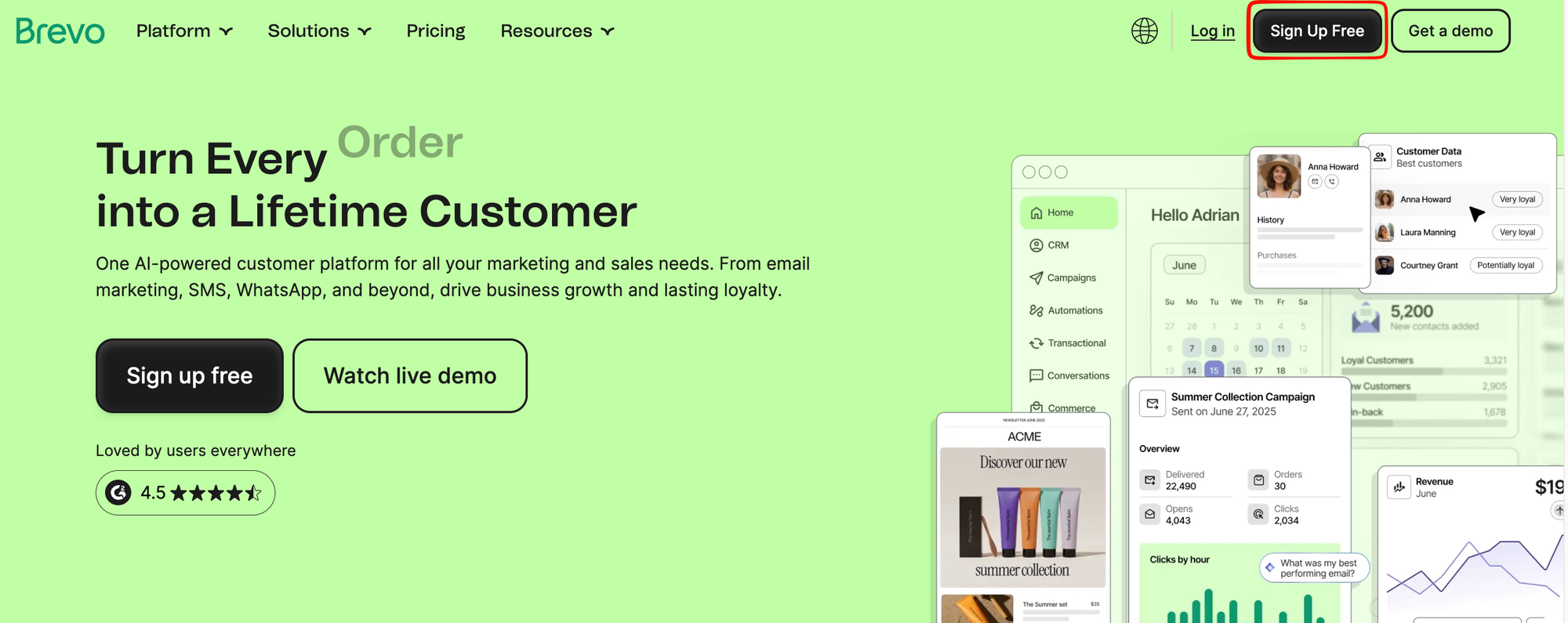 Brevo Homepage - Click Sign Up Free
Register Your Account
- Enter your email address
- Create a strong password (at least 8 characters)
- Agree to the terms and conditions
- Click Create your account
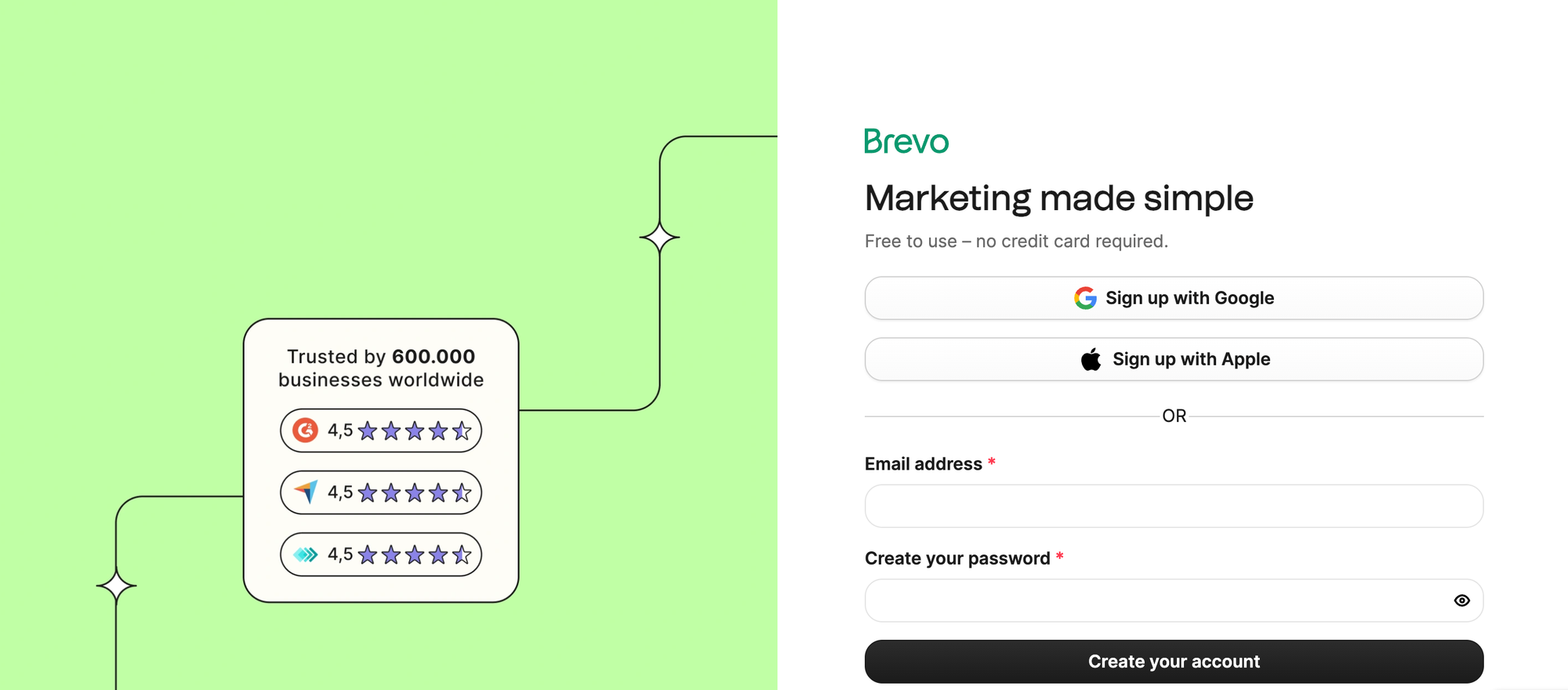 Brevo Signup Form
Verify Your Email
- Check your email inbox for a verification message from Brevo
- Click the verification link in the email
- Your account is now active
Step 2: Collect Your SMTP Credentials
Once logged into your Brevo account, follow these steps to get your SMTP information:
Navigate to SMTP Settings
- Click on your profile icon in the top right corner
- Select Settings from the dropdown menu
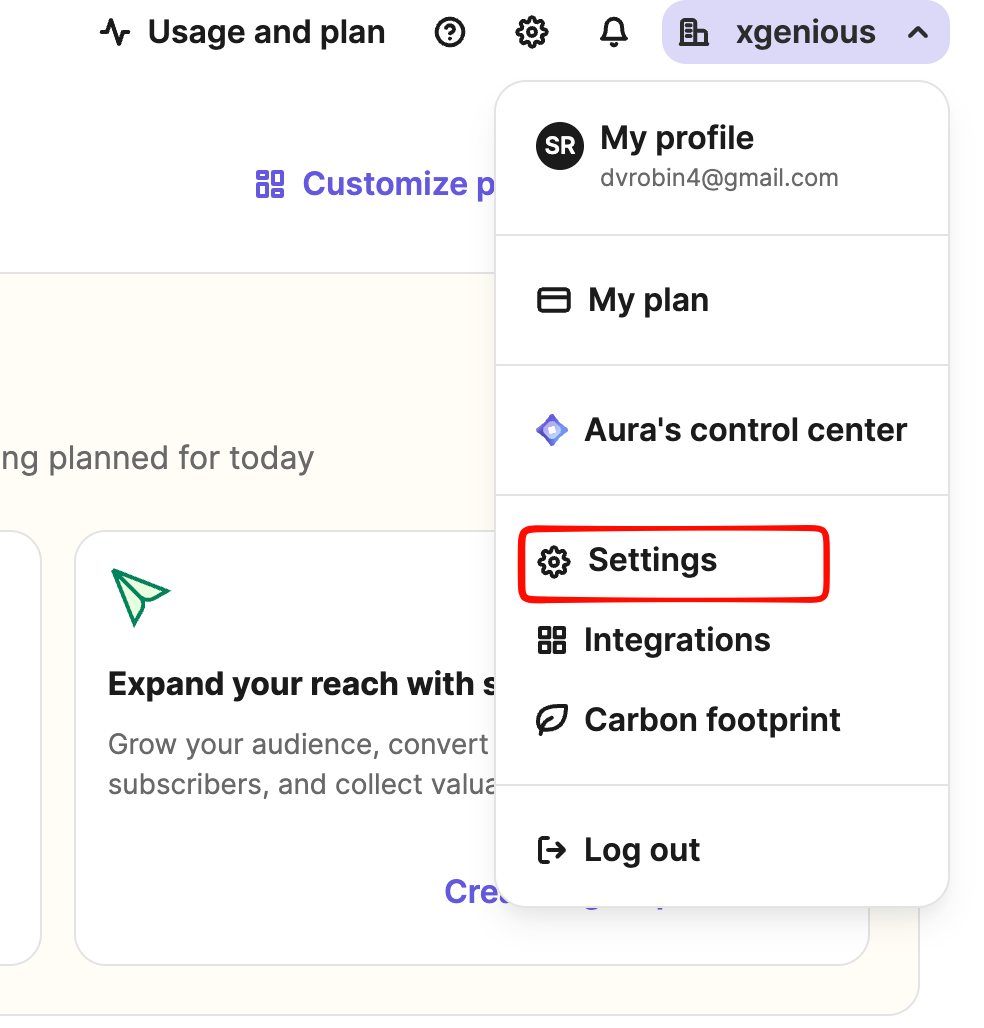 Brevo Settings Menu
- In the left sidebar, click on SMTP & API
- You'll see the SMTP information section
Copy Your Credentials
You'll see your SMTP settings displayed:
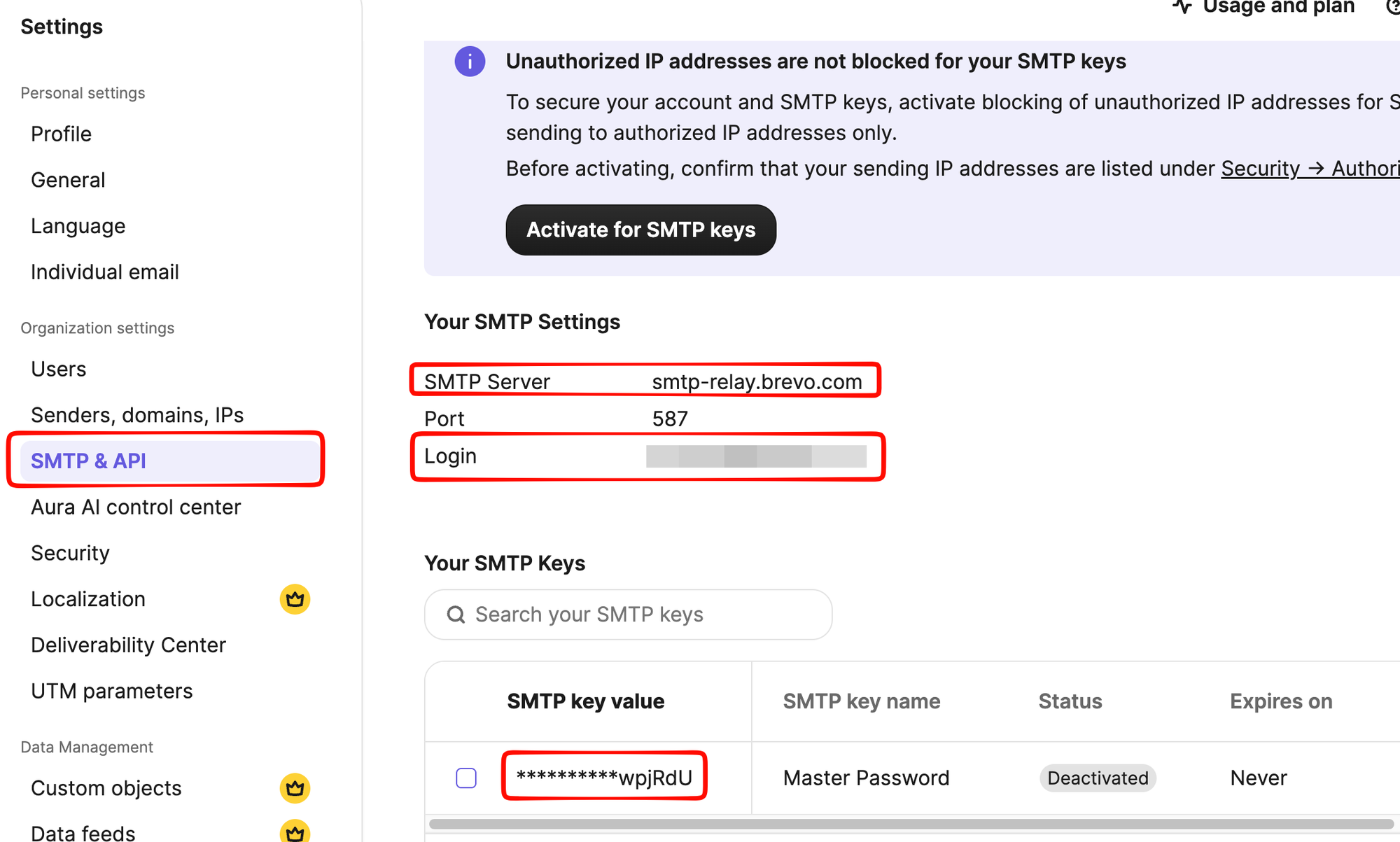 Brevo SMTP Settings
You'll need the following information:
- SMTP Host:
smtp-relay.brevo.com - SMTP Port:
587(TLS) or465(SSL) - SMTP Username: Your Brevo login email address (also called "Master Password")
- SMTP Password: Your Brevo password
- Encryption Type: TLS (for port 587) or SSL (for port 465)
<alert type="info">
Note: Brevo provides your email address as the username. The "Master Password" shown in your SMTP & API settings is your account password. You can also create dedicated SMTP keys for additional security, but using your master password works fine for basic SMTP setup.
</alert>
Step 3: Configure Brevo SMTP in Laravel (.env Method)
This is the recommended approach for Laravel developers - configure SMTP directly in your .env file.
Update Your Laravel .env File
Open your .env file and add the Brevo SMTP configuration:
MAIL_MAILER=smtp
MAIL_HOST=smtp-relay.brevo.com
MAIL_PORT=587
MAIL_USERNAME=your-email@example.com
MAIL_PASSWORD=your-brevo-password
MAIL_ENCRYPTION=tls
MAIL_FROM_ADDRESS=noreply@yourdomain.com
MAIL_FROM_NAME="Your App Name"
Verify Configuration
Test your configuration with Laravel Tinker:
php artisan tinker
Then run:
Mail::raw('Test email from Brevo', function($message) {
    $message->to('your-email@example.com')
            ->subject('Brevo SMTP Test');
});
If successful, you'll see the email in your inbox.
Step 4: Configure SMTP in Your Admin Panel (Alternative)
Access Admin Settings
- Log in to your admin panel
- Go to General Settings → SMTP Settings
- You'll see a form with the following fields
Fill in SMTP Details
Complete each field with your Brevo credentials:
| Field | Value |
|---|---|
| SMTP Mailer | SMTP |
| SMTP Mail Host | smtp-relay.brevo.com |
| SMTP Mail Port | 587 (recommended) or 465 |
| SMTP Mail Username | Your Brevo email address |
| SMTP Mail Password | Your Brevo password |
| SMTP Mail Encryption | TLS (for port 587) or SSL (for port 465) |
Example Configuration
SMTP Mailer: SMTP
SMTP Host: smtp-relay.brevo.com
SMTP Port: 587
SMTP Username: your-email@example.com
SMTP Password: your-brevo-password
Encryption: TLS
Step 4: Set Your Global Email Address
After configuring SMTP, you must set a global email address for transactional emails:
- In the same General Settings page, find Email Template or Global Email
- Enter the same email address you used as your SMTP username
- This email will appear as the sender for all system emails
- Save your settings
Step 5: Create Laravel Mailable Class
For production Laravel applications, use the Mailable class pattern:
Generate Mailable Class
php artisan make:mail WelcomeEmail
Create Your Mailable Class
File: app/Mail/WelcomeEmail.php
<?php

namespace App\Mail;

use Illuminate\Mail\Mailable;
use Illuminate\Mail\Mailables\Content;
use Illuminate\Mail\Mailables\Envelope;

class WelcomeEmail extends Mailable
{
    public function envelope(): Envelope
    {
        return new Envelope(
            subject: 'Welcome to Our App',
        );
    }

    public function content(): Content
    {
        return new Content(
            view: 'emails.welcome',
        );
    }
}
Send Email from Controller
use App\Mail\WelcomeEmail;
use Illuminate\Support\Facades\Mail;

// In your controller
Mail::to($user->email)->send(new WelcomeEmail());
Step 6: Setup Laravel Queues (Production)
For production Laravel applications with high email volume, use Laravel queues:
Configure Queue
Update .env:
QUEUE_CONNECTION=database
Create Queue Table
php artisan queue:table
php artisan migrate
Send Email via Queue
Mail::to($user->email)->queue(new WelcomeEmail());
Process Queue
php artisan queue:work
For production, use Supervisor:
[program:laravel-worker]
process_name=%(program_name)s_%(process_num)02d
command=php /path/to/artisan queue:work --sleep=3 --tries=3
numprocs=8
directory=/path/to/laravel
autostart=true
autorestart=true
redirect_stderr=true
stdout_logfile=/var/log/laravel-worker.log
Step 7: Test Your Configuration
Send a Test Email
- Use the Tinker method above (recommended)
- Or look for Send Test Email button in Brevo dashboard
- Enter a recipient email address
- Click Send Test
- Check your inbox for the test email
If successful, your Brevo SMTP for Laravel is configured and ready for production.
Free SMTP for Laravel: Brevo vs Alternatives
Choosing the right free SMTP provider is crucial for Laravel projects. Here's how Brevo compares:
| Feature | Brevo | Resend | Gmail SMTP | Mailgun |
|---|---|---|---|---|
| Free Emails/Day | 300 | 100 | 500 | 100 |
| Free Emails/Month | ~9,000 | 3,000 | ~15,000 | 10,000 |
| Laravel Integration | SMTP + Custom | SMTP + Package | SMTP | SMTP + Package |
| Sender Authentication | SPF/DKIM included | Included | Requires setup | Included |
| Deliverability | ✅ Excellent | ✅ Excellent | ⚠️ Limited | ✅ Excellent |
| Free Domain Verification | ✅ Yes | ✅ 1 domain | ❌ No | ✅ Yes |
| Email Templates | ✅ Yes | ✅ Yes | ❌ No | ✅ Yes |
| API Access | ✅ Yes | ✅ Yes | ❌ No | ✅ Yes |
| Bounce Management | ✅ Yes | ✅ Yes | ❌ No | ✅ Yes |
| Best For | Startups | Developers | Testing | High Volume |
Winner for Laravel: Brevo - 300 emails/day free tier is the highest, with excellent deliverability and production-ready features.
Brevo Free Plan Limits
- Email sending limit: 300 emails per day (highest free tier)
- Monthly limit: Up to 9,000 emails
- Contacts: Unlimited
- Support: Community support
- Custom Domain: Supported with SPF/DKIM
- API Rate Limit: 300 requests/minute
- Email Templates: 5 templates
- Automated Campaigns: Not included (upgrade required)
<alert type="warning">
Upgrade Path: If you exceed 300 emails/day, Brevo plans start at just $8/month for 20,000 emails, making it cost-effective as you scale.
</alert>
Troubleshooting
Authentication Failed
- Problem: "SMTP authentication failed" error
- Solution: Double-check your email address and password. Make sure caps lock is off.
Connection Timeout
- Problem: "Connection timed out" error
- Solution: Verify you're using the correct host (
smtp-relay.brevo.com) and port (587 or 465).
Emails Not Sending
- Problem: Configuration saved but emails aren't being sent
- Solution:
- Verify your global email address matches your SMTP username
- Check Brevo's email logs in your account dashboard
- Ensure you haven't exceeded your daily email limit
Port Issues
- Problem: Connection refused on port 587 or 465
- Solution: Try switching between ports or contact your hosting provider about firewall restrictions
Next Steps
- Review your Brevo dashboard to monitor email sending
- Check email delivery reports in Brevo
- Configure email templates for different notification types
- Set up sender authentication (SPF/DKIM) for better deliverability
Security Best Practices
- Never share your SMTP password
- Consider using an API key instead of your password for production
- Regularly review Brevo's security settings
- Enable two-factor authentication on your Brevo account
Production Best Practices for Brevo SMTP in Laravel
Email Deliverability with Free SMTP
-
Verify Your Domain
- Add SPF record:
v=spf1 include:relay.brevo.com ~all - Add DKIM records via Brevo dashboard
- Setup DMARC:
v=DMARC1; p=none; rua=mailto:your-email@example.com
- Add SPF record:
-
Monitor Email Health
- Check bounce rates in Brevo dashboard
- Monitor complaint rates (keep below 0.1%)
- Review spam reports regularly
-
Follow Email Best Practices
- Use clear, professional sender names
- Include unsubscribe links (required by law)
- Test emails in development before sending
- Avoid spammy keywords and suspicious links
Rate Limiting & Throttling
For high-volume applications, implement throttling:
// Send in batches with delays
foreach ($users->chunk(100) as $chunk) {
    foreach ($chunk as $user) {
        Mail::to($user->email)->queue(new WelcomeEmail());
    }
    sleep(1); // Delay between batches
}
Email Testing in Development
Use Brevo's sandbox environment:
# In development .env
MAIL_HOST=sandbox.smtp.mailtrap.io
MAIL_PORT=465
MAIL_USERNAME=your-mailtrap-inbox-id
MAIL_PASSWORD=your-mailtrap-password
Or use Brevo's test mode to catch errors before sending:
if (app()->environment('production')) {
    Mail::to($user->email)->send(new WelcomeEmail());
} else {
    // Test locally
    Mail::to('test@example.com')->send(new WelcomeEmail());
}
Monitoring & Analytics
Track email performance:
// In your notification listener
Mail::listen(function ($message) {
    \Log::info('Email sent', [
        'to' => $message->getTo(),
        'subject' => $message->getSubject(),
    ]);
});
Monitor in Brevo dashboard:
- Delivery status
- Open rates
- Click rates
- Bounce rates
- Complaint rates
Common Issues with Free SMTP for Laravel
Issue 1: Emails Marked as Spam
Cause: Missing SPF/DKIM records Solution:
- Add domain to Brevo (Settings → Senders & Domains)
- Verify SPF record in your DNS
- Enable DKIM signing
- Wait 48 hours for DNS propagation
Issue 2: 300 Emails/Day Limit Reached
Cause: Free tier quota exceeded Solution:
- Upgrade to paid plan ($8/month)
- Implement queue prioritization
- Send non-urgent emails in batches during off-peak hours
- Consider Resend (100/day) + Brevo (300/day) combined strategy
Issue 3: Emails Not Sending in Production
Cause: Incorrect queue worker setup Solution:
# Verify queue is running
php artisan queue:failed

# Restart queue worker
php artisan queue:restart

# Check logs
tail -f storage/logs/laravel.log
Issue 4: SMTP Connection Timeout
Cause: Firewall blocking port 587 Solution:
- Try port 465 (SSL) instead:
MAIL_PORT=465
MAIL_ENCRYPTION=ssl
- Contact hosting provider to unblock SMTP ports
- Use API-based service like Resend instead
FAQ - Free SMTP for Laravel
Q: Is Brevo SMTP free for production use? A: Yes! 300 free emails/day is perfect for small to medium Laravel applications. Upgrade plans start at $8/month.
Q: Does Brevo work with Laravel 10+? A: Yes, Brevo SMTP works with all Laravel versions 6.x and above. No package required.
Q: Can I use Brevo for transactional emails only? A: Yes. Brevo is designed for transactional emails. For marketing emails, you need additional configuration.
Q: What happens if I exceed 300 emails/day on the free plan? A: Emails will be queued and sent the next day. Your account won't be suspended, but delivery may be delayed.
Q: Is Brevo's free SMTP secure for password storage?
A: Yes. Brevo SMTP is encrypted. Store your password in .env (never in code) and enable two-factor authentication on your Brevo account.
Q: Can I send emails without Laravel queue system? A: Yes, but queues are recommended for production. Without queues, slow SMTP responses will slow down your application.
Q: How do I scale from Brevo's free plan? A: Upgrade to Brevo paid plan (300-50,000 emails) or combine with another service like Resend for overflow traffic.