

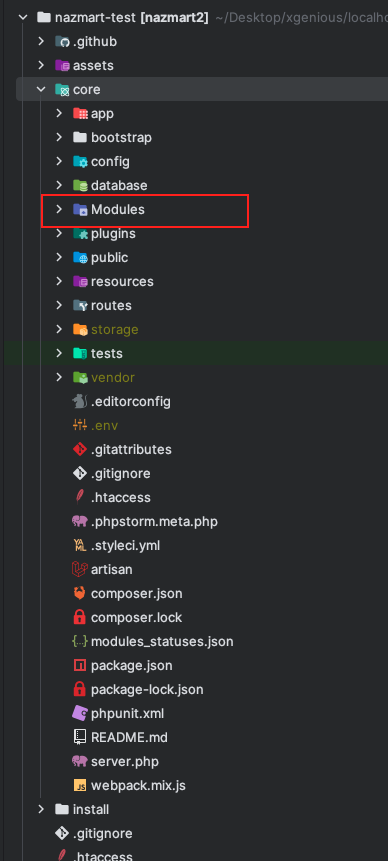
Custom Theme DevelopmentCreate your custom directory inside the “themes” directory with a unique name in small letters with no white space, If white space is needed replace it with a “_” sign. The name must be unique and in snake case.themes Directory: core > resources > views > themes
The directory must contain a JSON file named theme.json as follows,
{
"name" : "Theme Name",
"slug" : "theme_slug",
"description" : "Your Theme Description",
"author" : "Your Theme Author Name",
"version" : "1.0.0",
"status" : true,
"screenshot" : [
{
"primary" : "primary.jpg",
"sort" : "desc"
}
],
"headerHook" : [
{
"style" : ["your_theme_css"],
"script" : [],
"blade" : []
}
],
"footerHook" : [
{
"style" : [],
"script" : [],
"blade" : []
}
]
}
slug must be the unique and same name as your custom theme directory.
-
statuswill determine if you want to activate or deactivate the theme -
screenshot
primary accepts an image file name. It will be the default preview image of the theme. It accepts only three types of image files (jpg, jpeg, png).
headerHookcontains your custom CSS, JS and blade file which will be rendered in the head of the application.
style field accepts an array you can place single/multiple CSS file names. It will be placed in the head section of the application automatically.File directory: yourThemeDirectory > assets > css
-
scriptfield accepts an array you can place single/multiple js file names. It will be placed in the head section of the application automatically.File directory: yourThemeDirectory > assets > js -
bladefield accepts an array you can place single/multiple blade file names. These blades will be rendered after the navbar and breadcrumb on the entire application.File directory: yourThemeDirectory > headerHookTemplate -
footerHookcontains your custom CSS, JS and blade file which will be rendered in the footer section of the application.
style field accepts an array you can place single/multiple CSS file names. It will be placed in the footer section of the application automatically.File directory: yourThemeDirectory > assets > css
-
scriptfield accepts an array you can place single/multiple js file names. It will be placed in the footer section of the application automaticallyFile directory: yourThemeDirectory > assets > js -
bladefield accepts an array with a single name, you can place single blade file names. You can render the blade files anywhere you want usingrenderFooterHookBladeFile()function.File directory: yourThemeDirectory > footerHookTemplate
Entire fronted blade files will be in frontend directory inside your custom theme directoryFile directory: yourThemeDirectory > frontend
 Screenshot
Check out our custom theme structure repository on GitHubhttps://github.com/xgenious-official/nazmart-theme-sample
[ Screenshot
](https://github.com/xgenious-official/nazmart-theme-sample)